
Contact Our Team
Registration and Payment
Registration for our programs is on a first-come, first-served basis.
Students enrolled in Rutgers Continuing and Professional Studies (CPS) are not considered matriculated Rutgers University students and, therefore, are not eligible for Rutgers University financial aid. However, payment options are available.to assist with tuition costs.
Start Learning with Rutgers Continuing and Professional Studies in 3 Easy Steps
Step 1: Pick Your Program
We offer programs across the fields related to communication, digital asset management, and creative operations.
Step 2: Apply
Complete your online application to secure your spot in the next Rutgers Continuing and Professional Studies cohort.
Many employers support the upskilling costs of these certificate programs. Connect with your human resources department to understand your organization’s policy. If your employer is paying for your tuition, please note this during the application process (there will be an application question relating to employer sponsorship).
If you need assistance during the application process, our admissions team is ready to support you. Please feel free to contact us at cps@comminfo.rutgers.edu or 848-932-7169.
Step 3: Create An ANCOR Account And Enroll
Upon acceptance into your program, Rutgers Continuing and Professional Studies will provide you with links to enroll into your program. These registration links will be utilized within our Application for Noncredit Online Registration (ANCOR) system.
Create an account in ANCOR to select and enroll in your desired program.
Once you've created an account, use the links provided by the Rutgers Continuing and Professional Studies enrollment team to add the program to your cart. Save money by utilizing our early registration 15% discount or bundle your six-month programs to save 10%. These discounts will be automatically reflected in your cart.
Payment Options
You can choose to pay either the bundled tuition price for your certificate or the monthly course rate. A detailed cost breakdown for each certificate is available on its listing page. Early registration discounts will be applied automatically when you add your program to the cart.
Pay In Full
Utilizing the ANCOR system, online registration is completed with a credit or debit card, or e-check. Registration is complete when your payment is processed.
Use Employer Support
Many employers support the upskilling costs of these certificate programs. Connect with your human resources department to understand your organization’s policy. If your employer is paying for your tuition, please note this during the application process (there will be an application question relating to employer sponsorship). Please feel free to contact us at cps@comminfo.rutgers.edu with any questions.
Apply For Sallie Mae Loans
- Step 1: Apply through Sallie Mae
Please be sure to enter these details when applying for your loan:- School name: Rutgers-University SCI Continuing & Professional Studies
- Grade level: Undergrad | Certificate
- Course of Study: Certificate or Other
- Enrollment Status: Less than Half Time
- Requested loan amount: Please list the exact cost of the course, rounded up to the nearest dollar. We can only approve a loan for the cost of our course.
- Step 2: Your application will come to our department for certification.
- Step 3: Once you are certified and Sallie Mae approves your loan, utilize the enrollment information provided by Rutgers Continuing and Professional Studies to complete your registration.
Accordion Content
-
If you need a copy of your payment receipt for a Professional Development Studies course, please review our instructions on printing a document directly from your account.
Login to ANCOR with your account information, then follow the steps below.
- In the upper right, click on My Account.
- When the drop down menu appears, select View/Pay Invoices.

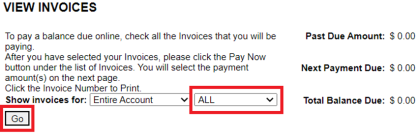
- From the VIEW INVOICES screen, select ALL, then GO.
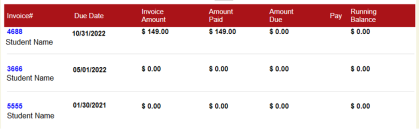
- Click on the blue invoice number to select the invoice. The invoice will appear on your screen and you may print or download it.
Have Questions?
We're here to help.